Level Design
Save the Snowman
Gameplay Video
Level Design Document
Level Design Concepts

The meadow acts as a progression gate where all three paths reconverge. Players must complete all routes to collect the required items before reaching the final objective.
Candy canes (right) and heat source shutdowns (left) serve as optional objectives and environmental breadcrumbs that guide player movement. Candy canes are spread across all three paths to promote exploration, while heat source shutdowns appear only on Paths 2 and 3, adding strategic depth.
Engaging a heat source delays the melting timer by 10 seconds, creating a clear risk–reward choice between detouring for extra time or pushing forward toward the Snowman.


The level’s color language relies on layered blues to clearly communicate snow, ice, and water while maintaining a cohesive winter aesthetic. Lighter, desaturated blues indicate safe, walkable snow and frozen terrain, while deeper, saturated blues suggest cold depth in the lake below. Suspended icicle platforms use icy tones and shape language to reinforce their function within the environment.
Warm accent colors are used intentionally for gameplay clarity. Yellow signals interactivity—cubes, candy cane highlights, and key objects stand out immediately against the cool palette. Red indicates heat, visually reinforcing the logic behind heat source shutdowns. Neutral gray distinguishes architecture from the natural environment, subtly guiding players toward important spaces like the shed containing a required item.
Together, the color system supports environmental readability, mechanic clarity, and a unified winter atmosphere without relying heavily on UI elements.
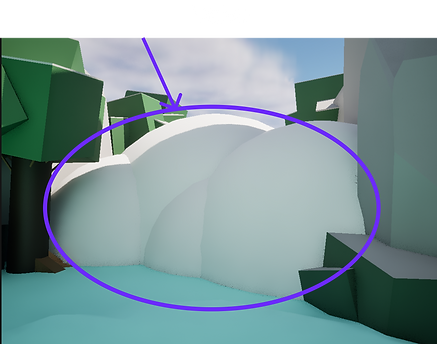
The avalanche functions as a level valve. After passing the first four candy canes, the starting courtyard is sealed off, preventing backtracking and locking the remaining path entrances. This reinforces commitment and preserves pacing.

This image demonstrates environmental storytelling through detail and player-driven systems. Footprints in the snow suggest recent movement without showing a character directly. Melting icicles and forming puddles communicate rising temperatures and environmental change. The snowfall, which the player activates, directly impacts the snowman’s survival by slowing the melting timer.
Together, these elements show past presence (footprints), present transformation (melting ice), and future consequence (the snowman’s fate), allowing the environment itself to tell the story without dialogue.
This screenshot shows the closed gate in the meadow where all three paths reconverge, with the Snowman visible on the hill beyond it—clearly reinforcing the final objective. A candy cane is fixed to the gate post and marked with a yellow glow, but unlike the floating collectibles throughout the level, it cannot be picked up through proximity.
This functions as an environmental puzzle. Players must recognize that this candy cane behaves differently and apply the snowball mechanic to activate the gate. The gate will only open once all six required survival items have been collected, creating a layered requirement: complete the objective, then correctly interpret the interaction. The solution comes from observing the space and applying learned mechanics—not from UI prompts.


The Snowman functions as the level’s central landmark. A persistent icon keeps his location visible from anywhere in the environment, providing constant orientation and direction. Positioned at the end of the level, he represents the primary objective—rescuing him completes the level and signals success.
The Level Start screenshot establishes immediate clarity and onboarding. The large bulletin board presents the required survival items, optional objectives, and core controls before gameplay begins. Red-highlighted text reinforces urgency, while the “Press C to Start” prompt clearly separates briefing from active play. Within the first frame, the player understands the objective, the stakes, and how to begin.


Target Tumble Trail
Gameplay Video
Side scroller
Gameplay Video
2D Spaceship Shooting Game
Blockmesh Adventure Game
Game Post Mortums
Tile Project Post Mortem
User Story & Project Goals:
At the beginning of this Tile Project, I developed a user story to outline the goal of the project and an initial description of how I planned to make the story a reality. I originally stated that:
“As a player, I want to harness the conveyor-like properties of Directional Forces tiles, so that my character can push a crate onto one, transporting it onto a pressure plate that unlocks a door and allows me to progress further in the game."
.png)
Original Story Board
After three completed sprints, I have not only accomplished this original vision but further enhanced it by adding Directional Door Control and Camera Control to make gameplay more dynamic and scalable.
Tools & Workflow:
Throughout the process, I used ClickUp to track my tasks, document activities, monitor project status, and share commentary and project links with teammates. The ClickUp platform allowed me to organize and reflect on my progress during each sprint.
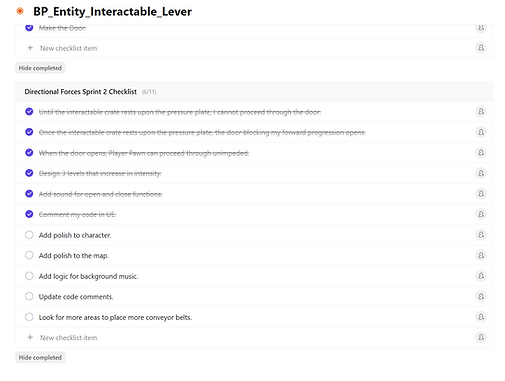
Sprint 1 – Directional Forces Mechanic
In the first sprint, my objective was to implement the BP_Tile_DirectionalForces mechanic, inspired by conveyor belts and force floors from Chip’s Challenge. I initially planned to create a complex network of linked destination tiles to simulate smooth movement for interactables. However, after reviewing existing code, I discovered I could repurpose the Move to Tile function with only minor modifications. This significantly reduced development time while still delivering the desired result.
One issue I encountered was animating the tiles to visually resemble a moving conveyor. I aimed to replicate the animated force floors but wasn’t able to fully achieve that effect. As a workaround, I used a custom material with alternating color planes to simulate movement and added glowing arrows to indicate direction. Although the lack of true animation was a minor setback, the mechanic still functioned effectively and looked convincing in context.
This sprint reinforced the value of adapting existing functionality rather than overcomplicating with custom systems.
Sprint 2 – Pressure Plate Integration
The second sprint focused on combining my Directional Forces mechanic with a teammate’s blueprint to enhance puzzle-solving potential. Initially, I was concerned about compatibility, as the original blueprint—BP_Entity_Interactable_Lever—was designed to toggle between floor and wall tiles rather than operate actual doors. However, the teammate had originally described the mechanic with the intention of opening and closing doors, which aligned perfectly with my vision.
I reworked the system and transformed it into BP_Tile_PressurePlate, a blueprint capable of activating or deactivating various level elements such as doors, bridges, and walls. This not only fulfilled my user story but also elevated the gameplay by enabling players to use pressure plates and conveyor belts to move interactable crates and solve increasingly complex puzzles.
This sprint highlighted my ability to interpret and adapt others’ mechanics to suit my level goals. It also emphasized the importance of communication and collaboration when merging blueprints in shared projects. The result was a more dynamic, layered gameplay system that empowered player creativity and problem-solving.
Sprint 3 – Refinement and Feature Expansion
By the third sprint, the foundation of the Tile Project was well-established, and I was able to focus on expanding the game's functionality with new features. There were no major technical issues during this sprint, and I successfully implemented two key enhancements: directional door control and camera transitions for larger maps.
Directional Door Control: This system allowed doors to open only when approached from specific directions. It added a strategic layer to level design by enabling one-way paths, player traps, and more complex puzzle logic. It encouraged players to think carefully about their movement and how their choices influenced progression through the environment.
Camera Transitions: This feature activates when the player steps on a BP_TileAnimController tile. It supports larger, multi-screen maps by dynamically shifting the camera to reveal new areas or for players to preview the map. It significantly improved spatial awareness and allowed me to create more immersive and expansive levels without overwhelming the player.
Sprint 3 represented a successful transition from basic mechanic implementation to advanced gameplay design. The features added in this phase enhanced both the depth and polish of the game, aligning with my long-term goals for dynamic level interaction and improved user experience.
Conclusion:
Throughout this project, I progressed from developing foundational mechanics to designing sophisticated, interconnected systems that encourage player creativity and exploration. Each sprint brought its own set of challenges and opportunities:
In Sprint 1, I learned how to adapt and simplify complex ideas by reusing existing functionality.
In Sprint 2, I learned to interpret and refine another developer’s work into a form that better supported my vision.
In Sprint 3, I successfully expanded the game’s scale and complexity while improving usability and player experience.
These iterative improvements not only strengthened the project’s core mechanics but also equipped me with valuable skills in problem-solving, integration, and user-focused design. The lessons from each sprint directly informed the next, resulting in a more polished and flexible gameplay system ready for future enhancements.